
How to watch Live TV
Pick a category, preview a channel without leaving the list, and open it full screen.
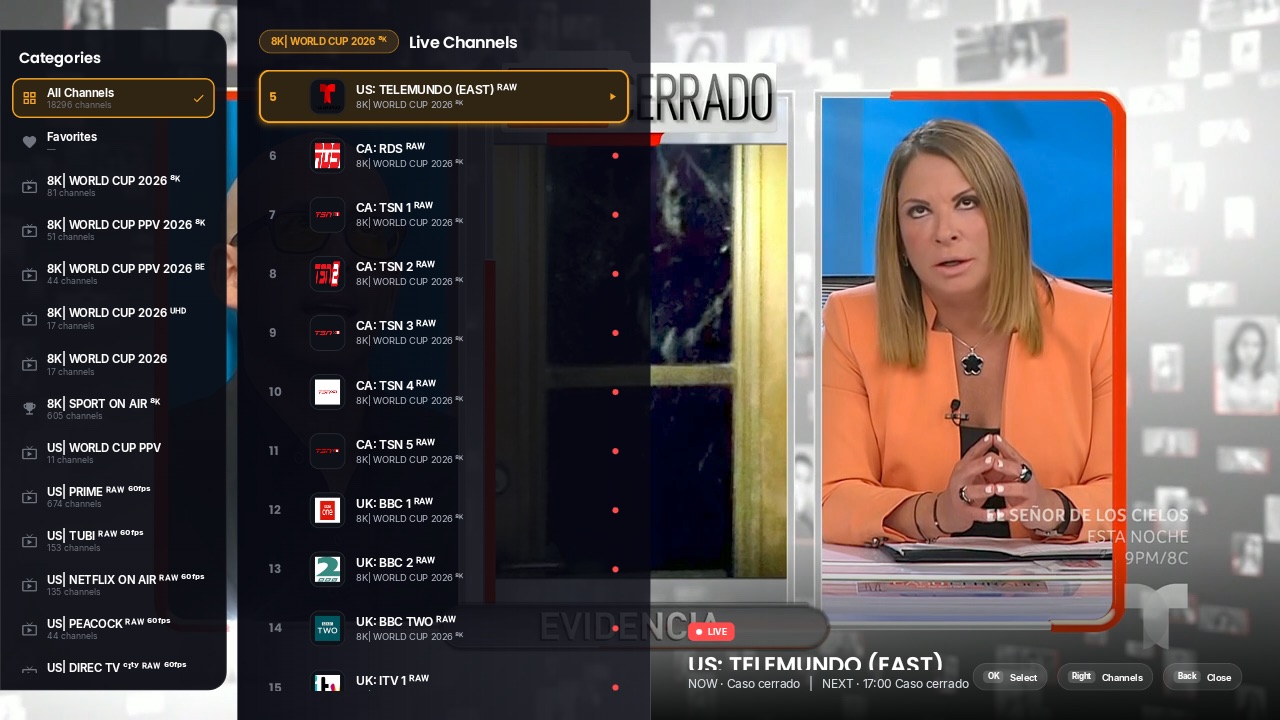
Step by step
- 1
Open Live TV
On Home, highlight the Live TV card and press OK.
- 2
Choose a category
Move ◀ to the Categories column, highlight a category and press OK — the channel list changes when you press OK, not while you scroll. “All Channels” at the top lists everything.
- 3
Preview a channel
Move ▶ into the channel list. Stop on a channel for half a second and a muted live preview starts on the right, with the programme on now, its progress and what’s next.
- 4
Watch full screen
Press OK on the channel. Use ▲ and ▼ (or CH+ and CH−) to change channel without going back to the list.
- 5
Go back
Press BACK to return to the list, and BACK again to return to Home.
Tips & tricks
- The app remembers the category you watched last and opens on it next time. Settings › Live TV › “Clear Live TV memory” starts fresh.
- Hold OK on a channel or a category for its options: add to Favorites, move it to the top, rename it or hide it.
- Categories you star are pinned to the top of the list with a gold star.
- With two or more playlists turned on, chips at the top of the categories (“All” and each playlist name) show one source at a time — press ▲ from the first category to reach them.
If something goes wrong
- ⚠“Preview unavailable” or a channel that will not start: see “What to do when a channel won’t play”.
- ⚠A category asks for a PIN: it is locked in Settings › Parental Controls. Enter your parental PIN to open it until the app restarts.
Related guides
Live player: change channels, jump back and open the guideHow to use FavoritesHow to search channels, movies and seriesManage content: hide, reorder and rename categories and channels
Reminder: 1ClickTV Player is a media player — bring your own authorized IPTV playlist or provider.