
Using 1ClickTV on a phone or tablet
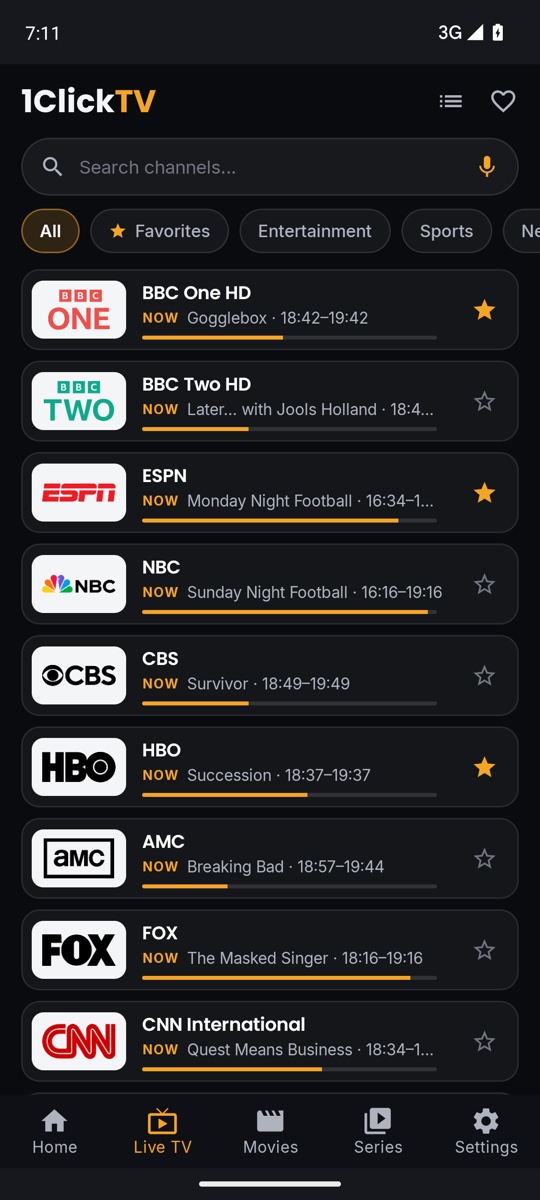
Tabs, Live TV, favourites and voice search on a touch screen.
Step by step
- 1
The tabs
At the bottom: Home, Live TV, Movies, Series and Settings. On a tablet they are in a rail on the left, and Live TV opens in two panes.
- 2
Home
Continue watching, your favourite channels with what’s on now, and shortcuts to TV Guide, Recordings, Downloads and Multi-view.
- 3
Watch a channel
In Live TV, tap a channel to play it. Press and hold a channel for a quick live preview with “Watch now”.
- 4
Favourites and categories
Tap the star on a channel to add it to favourites, and the ★ Favorites chip to see only them. “More” or the list icon opens all categories.
- 5
Search by voice
Tap the gold microphone in the search box and say the channel name.
Tips & tricks
- Settings › Playlists › Manage content works on the phone too: drag a category or channel by its ⋮⋮ handle to reorder it, and use ⋮ to rename or hide.
- Downloads on the phone wait for Wi-Fi unless you change Settings › Storage › “Download over Wi-Fi only”.
- With Parental Controls on, the phone app asks for your PIN every time it opens.
Related guides
The player on a phone: channels, full screen, audio and subtitlesHow to download movies and episodes to watch without internetHow to install 1ClickTV on an Android phone or tablet
Reminder: 1ClickTV Player is a media player — bring your own authorized IPTV playlist or provider.